
Lawn Buddy Management Software
Lawn Buddy, LLCBusiness
4.0100.00 Reviews
- Version
- 6.0.323
- Installs
- 10.00K
- Age Rating
- Everyone
Screenshots
Our Review of Lawn Buddy Management Software
 Analysis by Appyee
I approached Lawn Buddy Management Software as a practical business tool rather than a general lawn-care guide. Its purpose is to help a lawn-care operator organize work and reduce the repetitive administration that tends to pile up between customer calls, visits, estimates, and follow-ups. That focus makes it much more relevant to a working service business than to a homeowner looking for advice about maintaining a garden.
My overall impression is that Lawn Buddy is most useful when it becomes the place where daily work is arranged before the day gets busy. The app is free to install, is aimed at Everyone, and comes from Lawn Buddy, LLC. It sits in the Business category, with a 4.0 average from around 160 ratings and over 10 thousand installs. Those figures suggest a modest but established user base rather than a huge general-purpose platform.
The important question is not whether it can replace every business system. It is whether it can make a small lawn-care operation less dependent on scattered notes, memory, text messages, and spreadsheets. In my view, that is the right way to judge it. It has a clear practical role, but the value depends heavily on how much of your work you are willing to move into one dedicated workflow.
How Lawn Buddy feels during a working day
I find it useful to judge Lawn Buddy by what happens between jobs, not just by how it looks when I open it. This section considers how a dedicated business workflow can help keep the next customer action visible during an interrupted day, and why a small, consistent update habit matters. That leads naturally to the practical question of whether the app’s free starting point offers enough value for your operation.
Speed expectations before the schedule gets crowded
A lawn-care management app needs to feel ready when the user is standing outside a property, sitting in a truck, or moving quickly between appointments. That is a different test from using an app casually at home. The useful standard here is not flashy animation or elaborate presentation; it is whether the software helps you get to the next business task without adding another layer of delay.
Lawn Buddy is built around organization and automation, so I would treat its strongest performance expectation as workflow efficiency. The benefit should come from having business information and recurring tasks arranged in a dedicated place instead of repeatedly rebuilding the same process by hand. That can save mental effort even when the individual actions are simple.
There is also a practical distinction between perceived speed and raw loading speed. An app can feel quick because it keeps the next action obvious, while a technically fast app can still feel slow if the user has to search through unclear screens. For Lawn Buddy, the quality of the setup matters. If customers, work details, and routine office tasks are entered consistently, returning to the app should be more straightforward than reconstructing the day from several unrelated tools.
I would not install it expecting a magic shortcut that removes all administration. A management system only becomes efficient after it has been given useful information and after the operator follows the same process repeatedly. The first stage can feel like work, especially for a solo owner who has always relied on memory. The payoff is more likely to appear after the app has enough structure to support regular decisions.
What happens during heavy-use moments
The most demanding moments are not necessarily technical ones. They are the moments when several kinds of work collide: a customer needs attention, a crew or operator is preparing for the next property, and the office side still needs to be kept current. This is where a dedicated lawn-care system has a meaningful advantage over a notebook or a collection of phone reminders.
A realistic example would be a small operator finishing a morning route while trying to remember which customer needs a follow-up, which job belongs on the next visit, and which administrative task was postponed yesterday. With a general calendar, those details may be split between appointments and notes. With Lawn Buddy, the intended value is to keep the business process closer together, so the operator can handle the next action without switching between several unrelated systems.
That does not mean the app eliminates pressure during a busy period. If information was entered late, inconsistently, or in different places, the app cannot fully repair the confusion. A useful habit is to update a job immediately after the visit rather than waiting until the end of the day. That small discipline reduces the chance that a customer detail or follow-up will be left only in memory.
Another practical tip is to separate urgent work from routine administration in your own operating habits. Use the app to support the business flow, but do not treat every reminder as equally important. A busy service day is easier to manage when the next property and the next customer action are clear, while less urgent office cleanup can be handled in a quieter block later.
This is one of the less obvious trade-offs with Lawn Buddy: automation can reduce repeated effort, but it also makes consistency more valuable. A paper notebook can be forgiving when entries are irregular because the owner can improvise. A digital workflow is more useful when the same information is recorded in the same way each time. Operators who accept that adjustment are more likely to feel the benefit during heavy use.
Reliability is more than simply opening the app
For a business tool, reliability means being able to trust the process around the app. I would look at whether the operator can return to the same workflow, recognize what needs attention, and recover from an interrupted day without starting again from memory. Lawn Buddy’s dedicated business focus gives it a stronger foundation for that purpose than a basic notes app.
Still, no management app should be treated as a substitute for sensible business habits. I would keep important customer and operational information organized outside the app as part of a broader business routine, particularly during the initial transition. That is not a criticism unique to Lawn Buddy; it is a reasonable safeguard whenever a company begins depending on a digital system.
Recovery matters most after interruptions. A phone call, a dead battery, a change in weather, or an unexpected customer request can break the planned sequence of the day. The best response is to return to the app and update the work as soon as the interruption ends, rather than trying to remember every change later. Lawn Buddy is more likely to feel dependable when it is used as the current business record instead of as an occasional diary.
I also prefer testing a new workflow with a limited portion of the business before moving everything at once. A small operator could begin with upcoming work and a manageable set of customers, learn where information belongs, and then expand. That approach makes it easier to identify friction without putting the entire operation under pressure during the learning period.
The app’s current version is 6.0.323, which indicates that it has progressed beyond an initial release. It was released on March 9, 2017, so it has had a long presence compared with a brand-new business app. I would take that history as a reason to evaluate the current experience directly, not as a promise that every device or workflow will feel identical.
Device constraints and the cost of keeping things simple
Lawn Buddy supports a minimum operating system of 7.1, making compatibility a relevant consideration for anyone using an older phone or tablet. That broadens the range of devices that may be able to run it, but compatibility alone does not guarantee a comfortable experience. Older hardware can still affect how quickly an app opens, how easily several tasks can be handled in succession, and how pleasant it is to use the device outdoors.
For a lawn-care operator, the phone is often exposed to conditions that are less controlled than an office computer. The screen may be used between properties, with limited time and attention. I would therefore judge the app on a device that the operator actually carries during the workday, rather than assuming that an office setup represents the real experience.
Resource demands are difficult to separate from the phone itself and the way the app is used. A business tool that is opened briefly for focused updates has a different practical impact from one left active throughout the day while the operator moves between many tasks. My advice is to watch how the phone behaves during a normal route: whether the app remains comfortable to return to, whether switching away interrupts the workflow, and whether the device still has enough battery for the rest of the workday.
Older-device users should also be realistic about multitasking. If you normally keep navigation, calls, messages, payment tools, and business software in rotation, the overall phone experience may matter more than Lawn Buddy alone. The app can organize the business side, but it cannot remove the limitations of an aging device or a crowded mobile workflow.
This is where Lawn Buddy may be a better fit than a full desktop system for a small operator: the work can be approached from the phone rather than requiring every update to wait until someone returns to an office. On the other hand, a business with several staff members, complicated reporting needs, or a strong dependence on desktop administration may prefer a broader platform designed around larger screens and more advanced controls.
Where it beats notebooks, calendars, and improvised systems
The usual alternatives are familiar: a paper notebook in the truck, a general calendar, a spreadsheet, message threads, or a mixture of all four. These tools can work surprisingly well at a small scale, especially when one person knows every customer and every route. They are also inexpensive and flexible. The problem appears when information has to be found quickly, repeated tasks must be remembered, or the business begins handling more work than one person can comfortably track.
Lawn Buddy’s advantage is specialization. Instead of asking a general-purpose calendar to represent an entire lawn-care operation, it is intended to organize the business around that type of service. That can make the workflow easier to understand and reduce the number of separate places where an operator has to look.
The trade-off is flexibility. A notebook accepts any unusual situation immediately, while dedicated software expects the operator to work within its structure. A spreadsheet can be reshaped for a very specific reporting habit, while an app may guide users toward a more consistent process. If your business is highly irregular or you only handle a few jobs occasionally, the extra structure may feel unnecessary.
I would also avoid comparing it with a large enterprise platform on features that a small lawn-care business may never use. The relevant comparison is whether Lawn Buddy helps a small team stay organized without the overhead of a system built for a much larger company. For that audience, a focused tool can be more approachable than a powerful but complicated alternative.
Who gets the most value from the app
I see the clearest fit for independent lawn-care professionals and small operators who are moving beyond informal record-keeping. If you are losing time to repeated office tasks, forgetting follow-ups, or keeping customer information in several places, the app’s focus is directly relevant. It is also a sensible option for someone who wants to begin organizing the business without paying an upfront installation fee.
The free price is helpful for testing the workflow, but users should pay attention to the in-app purchase range, which runs from around twelve dollars to three hundred sixty dollars per item. That is a wide span, so I would review the purchase choices carefully before building the entire business around the app. Free installation does not automatically mean that every useful business function will remain free.
That pricing detail also affects who should try it first. A new operator with a small customer list can explore whether the process saves time before making a larger commitment. A more established company should consider the total cost of the features it actually needs, rather than judging the app only by its free download.
I would skip Lawn Buddy if you are a homeowner looking for lawn-maintenance instructions, because its purpose is business organization rather than personal gardening education. I would also hesitate if your operation already depends on a mature accounting, scheduling, and customer-management system that your staff understands well. Moving systems only makes sense when the new workflow solves a real problem.
Questions I would settle before relying on it
Will it work for a solo operator? That is the most natural use case to test first. A single owner can establish one consistent routine and quickly notice whether the app reduces repeated administration. The evaluation should focus on the tasks that currently cause the most friction, not on how many functions appear available.
Can it support a growing operation? It may help as a business becomes more organized, but growth introduces questions about team habits, responsibility, and the need for more detailed oversight. I would test it with the people who will actually use it, because a workflow that makes sense to the owner may be less obvious to a crew member or office assistant.
Is it suitable for irregular or seasonal work? It can still be worth testing, especially if the main problem is remembering customer-related tasks between visits. However, occasional users may not gain enough from a dedicated system to justify learning a new routine. The more frequently the business repeats similar work, the stronger the case for automation and centralized organization.
Will an older phone be enough? The minimum operating system requirement is 7.1, so the app is not limited to only the newest devices. Even so, I would test it on the exact phone used in the field, with the other apps normally needed for calls, navigation, and customer communication. That is the only reliable way to judge whether the complete workday feels comfortable.
What should happen before paying for anything? I would map the current process first, then identify one repeated problem to solve. Try the free installation, enter a realistic but manageable set of business information, and use the workflow through a normal work period. If it reduces searching and forgotten follow-ups, expand gradually. If it adds more entry work than it removes, a simple calendar or spreadsheet may remain the better choice.
My performance verdict for a lawn-care business
Lawn Buddy is best understood as a focused organizational tool for lawn-care companies that have outgrown memory, paper notes, or disconnected phone apps. Its strongest promise is not entertainment or visual polish; it is the possibility of making recurring business work more orderly and less repetitive.
In my judgement, the app deserves consideration from a solo operator or small team that wants a mobile-first way to bring business tasks into one dedicated workflow. The free entry point makes experimentation easier, while the long-running product and current version suggest that it is not a temporary concept. At the same time, the in-app purchase range means that a serious user should examine the cost of the functions needed for daily operations.
Performance should be judged in context. On a suitable device, with consistent data entry and a clear routine, Lawn Buddy should be evaluated for how quickly it helps you recover the next business action during a busy day. On an older or heavily loaded phone, the surrounding device experience may become the limiting factor. Either way, the app cannot compensate for a process that is never updated.
My recommendation is to treat Lawn Buddy as a practical trial for organizing a real lawn-care workflow, not as an automatic replacement for every business system. It is a good match when repeated administration is the problem and a dedicated structure would help. It is less convincing for homeowners, highly irregular operators, or established businesses that already have a reliable and more comprehensive platform. If your current system is a notebook plus several reminders, this app has a reasonable chance of making the work easier to control.
Verdict
Strengths of Lawn Buddy Management Software
- Centralizes lawn-care scheduling, customer records, and service details.
- Helps organize recurring jobs and reduce missed appointments.
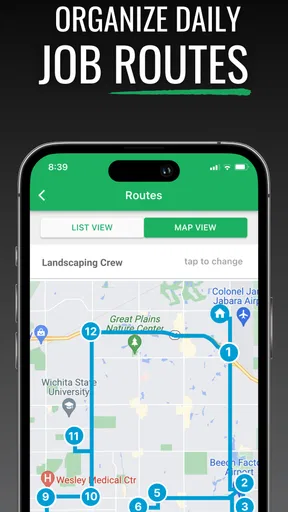
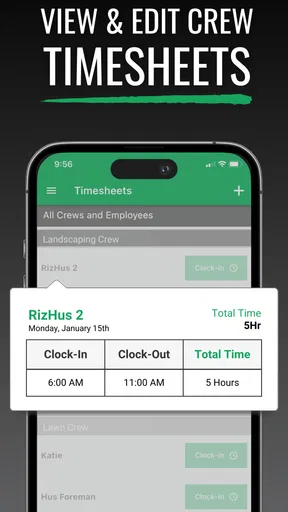
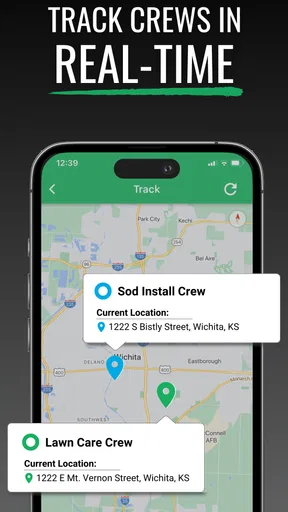
- Useful tools for managing crews, routes, and daily workloads.
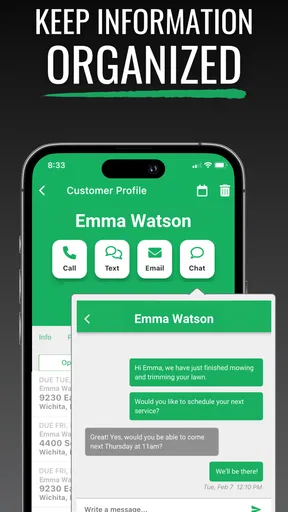
- Can make client communication and service updates more consistent.
- Supports business growth by keeping operational information in one place.
Limitations of Lawn Buddy Management Software
- May take time to configure properly for a larger lawn-care operation.
- Some advanced features may require a paid plan or subscription.
- Users may need training before staff can use every management tool.
- Dependence on internet access could affect field updates and scheduling.
- Small businesses may find some features unnecessary for their needs.
Similar Picks in This Category
View All
LinkedIn: Community & Network
LinkedIn3.8

Zoom Workplace
zoom.com4.1

Microsoft Teams
Microsoft Corporation4.6

Meta Business Suite
Meta Platforms, Inc.4.6

Webex Meetings
Cisco Systems, Inc.4.5

TeamViewer Remote Control
TeamViewer4.4
Frequently Asked Questions
What is Lawn Buddy Management Software used for?
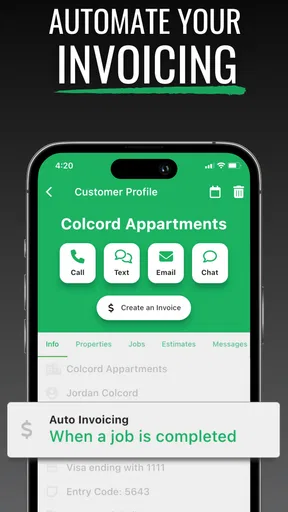
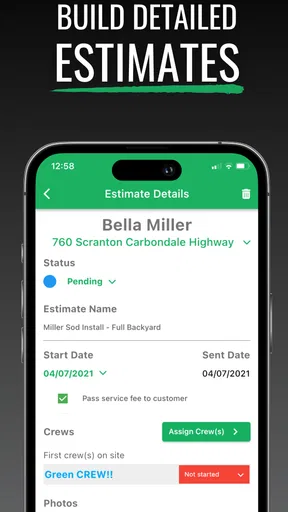
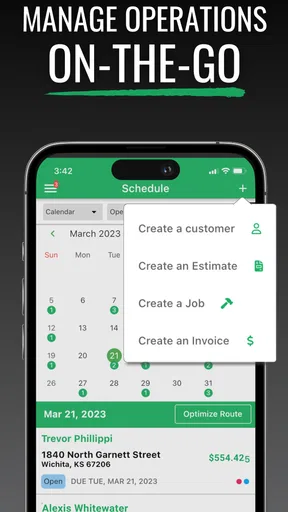
Lawn Buddy is a business management platform designed for lawn care, landscaping, and other outdoor service companies. It helps organize customers, properties, estimates, jobs, recurring services, scheduling, team assignments, invoices, payments, and communication in one place. It is intended primarily for service providers and their staff rather than homeowners looking for a simple lawn-care reminder app.
Is Lawn Buddy suitable for a small lawn-care business or only larger companies?
Lawn Buddy can be useful for small businesses as well as growing lawn-care and landscaping companies. Smaller teams may use it to replace scattered spreadsheets, calendars, and messaging tools, while larger operations can benefit from centralized scheduling, route organization, customer records, and employee coordination. The best fit depends on the number of jobs, users, and management features your business requires.
Can Lawn Buddy help with scheduling recurring lawn-care services?
Yes, recurring service management is one of the platform’s most relevant functions for lawn-care businesses. Depending on the plan and configuration, you can organize repeat visits, assign work to crews, review upcoming jobs, and keep service information connected to each customer or property. Businesses should still verify the current scheduling and route-management features before subscribing.
Does Lawn Buddy support estimates, invoices, and customer payments?
Lawn Buddy is built to support important administrative tasks such as preparing estimates, managing customer accounts, creating invoices, and handling payments through available integrations or built-in tools. These features can reduce manual paperwork and make it easier to track completed work and outstanding balances. Payment methods, processing fees, and available integrations may vary by subscription or account setup.
Is Lawn Buddy available on Android and iOS, and is my business data secure?
Lawn Buddy is designed to be accessed through modern web and mobile experiences, helping owners and field teams manage work away from the office. Availability and features can differ between Android, iOS, and browser versions, so checking the official listing is recommended before downloading. As with any business platform, use strong passwords, limit staff permissions, and review the provider’s privacy and security policies.
